Category Archives: Uncategorized

“Identity & Cloud Services” Vittorio Bertocci

[MS Techdays 2009] Summary “Identity & Cloud Services” Vittorio Bertocci

Cloud Services
The cloud is about capabilities, “Someone is providing It” and not about the hardware, “The means through what it is provided”.

The way we are moving to services is comparable to the evolution of manufactories. In the early ages every factory had its own power plant and part of manufacturing was providing in your own power to operate the machinery. Nowadays manufactories are just connected to the electricity grid providing this power service to their clients.

Cloud Identity
The manufactory example is applicable to identities.

Every company has its own directory system for storing usernames and passwords. The challenge is how to connect all the different protocols, providers and platforms to get identities into the cloud going beyond the company’s network boundaries.

What if identity management could move to the cloud and be consumed as service i.e. outsourcing or externalizing authentication and authorization? In other words leveraging trust relationships.

Introduction to Claims Based Identity
Definitions:

  • Claims = statements about an entity (subject) made by an entity (issuer)
  • Tokens = signed XML fragments which transport credentials and claims about a subject
  • Security Token Service (STS) = web service that issues security tokens

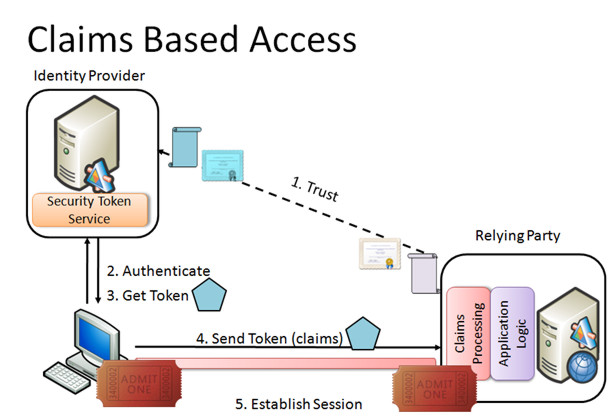
Simplified model for Subject “Identity Provider ” Relying Party:

  1. There is trust relationship between Identity Provider and Relying Party based on certificates
  2. Subject identifies against Identity Provider and request token for accessing Relying Party.
  3. Identity Provider (operates as STS) issues the token and sends it to Subject.
  4. Subject sends token to Relying Party.
  5. Relying party returns ticket that Subject can use to set up an connection with Relying Party.
CloudServices1

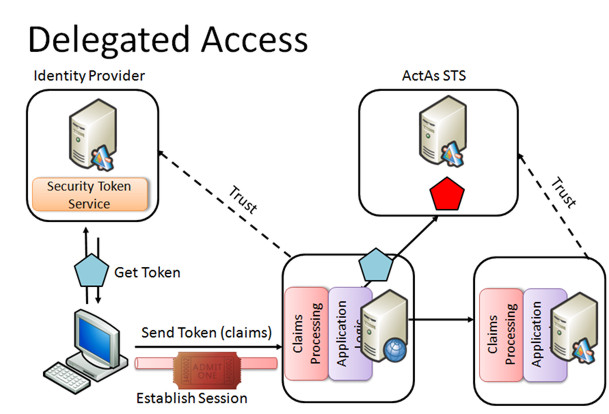
In an elaborate model the Relying Party can be a Subject of in another Claim Based Access network creating as such a trust relationship between two networks.
CloudServices2

This latest model is ideal to move identities to the cloud. In the cloud a trusted third party Identity Provider can bridge identities between two company networks. In fact this is what .NET Access Control Service part of the new Azure platform is all about.

.NET Access Control Service .NET Access Control Service (ACS) encapsulates the following:

  1. A Security Token Service allowing the previously described delegated access:
    • token issuer
    • claims transformation rules for access requests from the cloud
    • trust management
  2. A portal where you manage access control rules
  3. An API to programmatically manage access control rules

A SDK for .NET Access Control Service can be downloaded from:
http://go.microsoft.com/fwlink/?LinkID=129448

The ACS STS brings to .NET solutions three STS’s: one for the solution itself, one for Workflow services and one for ServiceBus services.

For the moment several identity types are supported but a convergence to SAML tokens is announced that would replace .Net identities, X509 identification, …

Scopes and Rules
By means of scopes and rules the access from the cloud is regulated.

Scopes allow you to associate a set of rules with a set of assets accessible through ACS. It contains an URI, a certificate and a list of identities.

Rules perform the claim transformation. One or more claims delivered by the Subject trying to access from the cloud are transformed into one claim for the delegated STS.

Conclusion
Identity management will not escape the shift to the cloud and will become nothing more than a service, consumed like any other service. It will make complex inter-company network identity management more transparent.

Share this postSave this post

“Introducing ‘Oslo’ – Microsoft’s Modeling Framework” Shy Cohen

[MS Techdays 2009] Summary “Introducing ‘Oslo’ Microsoft’s Modeling Framework” Shy Cohen

I added some personal interpretations!

So what’s modeling Anyway?
A model is a simplification to address complexity, showing structure and providing just enough info for a given purpose. It is captured in a concrete form that allows easy sharing.

Modeling is the art of creating a model. (Duh :))

Software modeling
Software modeling is trending toward executable data. It is the logical next step in the evolution going from assembler over C to C#. Where C# added a virtual machine and intermediate language to the stack of compilers, we now want to add our own language and runtime to it.

Why? Since the introduction of Domain Driven Development we are seeing the advantages of implemented objects that are structured in a way very close to the problem domain. Wouldn’t it be great if we could express business logic in a language that is close to the problem domain and then just compile the language? This would make code very flexible, transparent, readableŠThis is idea of the Domain Specific Languages.

Everybody is doing it!
If you have a look at the latest product releases, you see model popping up in one way or another. CAML in MS Office SharePoint, X++ in MS Dynamics, XLANG in MS BizTalk, …

So what’s the problem?
Everybody is doing it in his own way! Every specific tool is a one-off implementation: different file formats (xml versus binary formats), inconsistent data formats (INI versus XML), no common storage mechanism (file versus DB ), …

The solution is Oslo The idea is to provide a modeling platform composed of:

  • A Modeling language: called M
    • Define data types
    • Define data instances
    • Describe DSL-s that compile text into data instances
  • A SQL-based repository for the models:
    • The repository is the heart of Oslo and is a SQL Server 2008 DB
  • A visual data manipulation tool called Quadrant
    • Is not yet released

Oslo1

Important to remember is that during its history the codename Oslo has changed from meaning. Started as a code-name for the umbrella of VS 10, BizTalk 6, BitTalks Sevices 1, System Center 4 and .NET 4, it finally became the codename for the modeling platform.

To define model MS provided us with Intellipad. It is the emacs for Windows. Besides other things it can be used as textual DSL to create model definitions. An example:

Oslo2

Models are compiled and then deployed. This double step will become one step in the near future.

Oslo3

Once deployed in SQL Server they can be accessed like any other data in the DB. This is how to model will appear in SQL Server once it is deployed:

Oslo4

Quadrant is the graphical DSL tool and will look like the screenshot below (sorry it is nearly unreadable).

Oslo5

Once defined, the models can be hosted in several runtimes, amongst others .NET applications.

Share this postSave this post

“Lean, Agile Techniques and Team System” Joel Semeniuk

[MS Techdays 2009] Summary “Lean, Agile Techniques and Team System” Joel Semeniuk

Introduction
The probability of success with a team of medium skilled developers working together is greater than the chance of success of a team of excellent developers not working together.

In his presentation, Joel Semeniuk gives us seven myths about software development and some solutions to overcome these. He has taken ideas from other industries amongst others the manufacturing of consumer goods and applied it to software development.

He started off with a quote of Toyoda’s principle from 1927 “If something goes wrong. Stop everything and fix it once forever.”

Myth 1 Early Specs Reduce Waste
Tell me everything you need into the finest detail and we will not make errors creating it.

The principle is to avoid waste. Waste is everything that is not adding value or preventing value to be created. What is value and what waste remains subjective!

Waste consists of:

  • Partially done work: avoid inventory of work to be done, one flow: develop – test – document
  • Extra features: not asked means no added value
  • Relearning: pass on learned lessons
  • Handoffs: handoffs are evil because you?l lose the problem context, use face to face communication and not only documents to pass information
  • Task switching: try to work as long as possible on the same task, it takes humans about 15 minutes to get from one task to another [Book Peopleware: Productive Projects and Teams by Tom DeMarco and Timothy Lister]. Set aside time for triage work.
  • Delays:  what to do when information is unavailable? Stop, switch task or guess? Collocated teams of users, developers, testers Šwork the best.
  • Defects: try avoiding mistakes but try to find mistakes as soon as possible or even better try to avoid making them. Inspect to prevent defects!

Myth 2 The Job of Testing is to Find Defects!
Build quality in from the start and avoid creating defects in the first place. Inspect often to find defects if you can’t prevent them. Once you have found a defect fix it so it never occurs again.

Example: Visual Studio check-in policies enforces best practices of quality gates.

Myth 3 Predictions Create Predictability!
We don’t plan to accurately predict the future!

Predications will be wrong if they

  • are complex,
  • must be detailed,
  • are about the future and
  • are dealing with uncertain environments.

The problem is that predictions are considered commitments (see myth 4).

We can deal with this uncertainty by:

  • Short feedback cycles
  • Detailing along the way
  • Releasing quickly with few but completed features
  • Having an experience team leader

Example: Team System support progress tracking of work items.

Myth 4 Planning is Commitment!
Eisenhower said in preparing for battle I have always found that plans are useless, but planning is indispensable!

Get in the process of frequent re-planning:

  • Wait until the last moment, you will have more information!
  • Make decision that reversible but avoid full flexibility.
  • Plan thoughtfully but commit sparingly

Myth 5 Paste Makes Waste!
Detailed planning ensuring we do it right the first time, mostly results in endless planning without ever starting the project. Companies that compete on time have considerable cost advantages over competitors.

Focus must be on:

  • Short feed-back loops
  • Repeatable reliable speed

Example: coding conventions and code analysis enforce automated quality control.

Myth 6 There is One Best Way!
Continuous improvement showed that there is no such a thing as the best way. A process can always get better and people are the cornerstones of the improvements. So you should embrace the people. Software development is a people process!

Myth 7 Optimize by Decomposition!
Optimizing of all the individual parts only leads to a sub-optimal result for the whole. Optimize the Whole!

Value based process improvements are the driving power for this. This means metrics or measurable results.

Examples: use a white board in the team to visualize performance and to gather lessons learned. Team System supports the gathering of performance metrics and putting these in SQL Analyst Cubes for reporting and analysis.

Conclusion
During the last decade some of the best practices and frameworks come closer together to support a more mature approach to software development. We see following approaches mutually enforcing themselves:

  • Test driven development
  • Feature driven development
  • Scrum
  • Prince 2
  • Lean
Share this postSave this post

“Data Access Hacks and Shortcuts” Stephen Forte

[MS Techdays 2009] Summary “Data Access Hacks and Shortcuts” Stephen Forte

Not very interesting so I haven’t a lot of notes. For details you should have a look at the conference slides.

Pass .NET collections to Stored Procedures
SQL Sever 2008 allows table valued variables. This in combination with Ado .Net 3.51 allows you to pass DataSets as variables to Stored Procedure. Moreover C# 3.0 can convert any collection, implementing IEnumerable, into a DataSet. So custom collections can be passed to stored procedures as variables.

Spying on your DB Server
LINQ will convert IQueryably to TSQL queries. You can spy on these queries by using following tools:

Over-normalization tackled with Views
If your DBA has gone overboard and created an over-normalized database it is better to create views then to o have queries with lots of unions between tables. These views will deconstructs complex data and optimize lookups.

What about updates? You still can access your tables in the normal way.

Binding REST data to Silverlight
Use LINQ to ADO.NET Data Services on the Silverlight client leverages your investments in LINQ but requires you to be 100% asynchronous.

Reporting DB design Online transactions have different needs when accessing a DB compared to reporting. The first are optimized for inserts. The second focus on fast selects. Why are we trying to do this on the same DB?

It is better to create a reporting DB next to the traditional OLTP DB. Move aggregated data to your data warehouse that is denormalized for fast access to optimally support reporting.

How to keep both in sync? You can create ETL code to move form your OLTP DB to your data warehouse but it should be clear there always will be latency between what’s online and what’s available in the data warehouse. Allowing no latency will remove all advantages because every update is synchronized immediately and affecting the reporting part.

Share this postSave this post

“Databinding in WPF” Gill Cleeren

[MS Techdays 2009] Summary “Databinding in WPF” Gill Cleeren

This was one of the presentations I didn’tt find very interesting so I haven’t a lot of notes. For details you should have a look at the conference slides.

Why Databinding
Databinding is not unique to WPF it appeared already in ASP.Net and Winforms applications. Not using databinding means writing a lot of code: code to get controls in an initial state, code to handle state update events (data object’s state) and code to update the visual controls (representation of the object on the GUI). This plumbing code is taken care of by databinding. A common mistake is thinking that databinding requires a DB. Other sources are supported as well.

What is Databinding
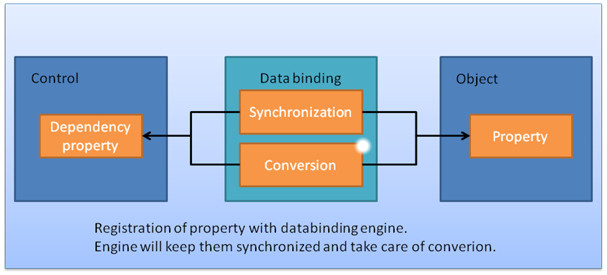
The basic concepts can be summarized as follows: properties of a control are bound to properties of a data object. Databinding, in other words, glues properties together.

databinding1

Databinding requires 4 things:

  • a source object
  • a target object
  • a source Property
  • a target Property

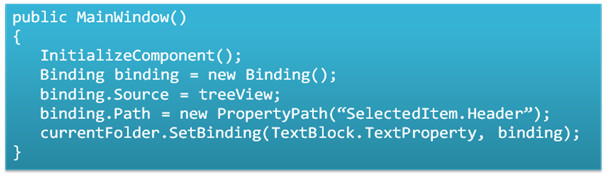
The SetBinding method links them together:

databinding2

databinding3

Binding can also be done by means XAML through Dependency Properties:

databinding4

The ElementName is the source of the binding. For XAML you?e required to add code responsible to handle change events by implementing INotifyPropertyChanged or INotifyCollenctionChanged. DataTemplates allow you to apply different visual templates to a control based on the data’s content.

Types of Binding

  • OneWay: Target updates when source changes
  • TwoWay: Change to either changes the other
  • OneTime: Similar to OneWay, changes aren’t reflected in Target (snapshot view)
  • OneWayToSource: Source updates when Target changes

The update events fire when the control loses focus, when a property in the source or target has changed or whenever an explicit call to the UpdateSource method is made.

Value Conversions, Grouping and Sorting

Value Conversion, before-after:

databinding5

Value conversions allow you to morph source values to different target values. This is done through the use of the ValueConversion attribute and the Convert and ConvertBack methods.

Bound collections can be grouped and sorted, see examples below, through views on the collection by implementing the ICollectionView:

databinding6

databinding7

Validation
Two types of validation are supported:

  • Exception validation rules: used when your data objects already have validation in them
  • Custom validation rules: if validation is added for the first time.

You can modify the presentation of a control when the validation has failed through setting the Validation.ErrorTemplate.

Data Providers
Two generic data providers are available:

  • XmlDataProvider: to databind XML, the data is gathered through XPath expressions
  • ObjectDataProvider: objects can be anything for example XAML declarations

Summary
The goal of databinding is to reduce the tedious coding needed to glue the interface controls to data objects holding the state. Syntax can be daunting to begin with but allows for a high degree of customization.

Share this postSave this post