MS TechDays March 11-12, 2009
Leave a reply
A new portal, grouping all the information from individual Belgian Microsoft user groups, is located under: http://www.mscommunity.be
The Problem
Recently on a project, I encountered following problem: an application had three sets of the same files in different folders.
Not very handy to install the application and completely inefficient considering disk space and maintenance. From my Linux background I immediately thought of symbolic links (symlinks, a folder that is a pointer to another folder).
I was under the impression that Windows did only know something like shortcuts. Shortcuts are very handy for users, double-click and you’ve in the correct folder, but useless for applications.
Junction Points come to the rescue…
During a weekend I started digging and discovered I could not be further away from the truth. Since Windows 2000 there is something like Junction Points, read Window’s implementation of symlinks (not 100% but it goes a long way). It is only supported on NTFS file-systems but that shouldn’t be a limitation anymore (you should be careful about your FAT-intake anyway ;)).
Since the introduction of Vista, Junction Points are fully integrated within the OS and you don’t need to install any toolkit anymore. Just from a cmd-prompt (you need admin-rights):
mklink [[/D] | [/H] | [/J]] link target
/D   Creates a directory symbolic link. Default is a file symbolic link.
/H   Creates a hard link instead of a symbolic link.
/J   Creates a Directory Junction.
link Specifies the new symbolic link name.
target Specifies the path (relative or absolute) that the new link refers to.
For the pre-VISTA users there are a lot of tools and resource kits you can download from Microsoft. However there is one compact solution from Sys Internals in the form of junction.exe (see http://technet.microsoft.com/en-us/sysinternals/bb896768.aspx)
usage: junction.exe [-s] [-q] <file or directory>
-q     Don't print error messages (quiet)
-s ;   Recurse subdirectories

usage: junction.exe [-d] <junction directory> [<junction target>]
-d     Delete the specified junction
example: junction d:\link c:\winnt
Something good to know for the pre-VISTA users: there are some side-effects in using files in junction folders linked to the recycle bin when you’ve using Windows Explorer to delete file in these folders. Depending on the size files are really deleted or just flagged for deletion. They disappear when you recycle the recycle bin. On http://en.wikipedia.org/wiki/NTFS_junction_point you’ll find more details about using commands like dir, rmdir in combination with junction folders. In VISTA all these problems are gone.
The solution
For the problem indicated above, I now have one folder like before and two junction folders pointing to this folder. Example:
Directory of E:\junction_example
14/12/2008  13:03    <DIR>          .
14/12/2008  13:03    <DIR>          ..
14/12/2008  13:00    <DIR>          copy_1 14/12/2008  13:03    <JUNCTION>     copy_2 [\??\E:\junction_example\copy_1]
14/12/2008  13:03    <JUNCTION>     copy_3 [\??\E:\junction_example\copy_1]
You even can assign specific access rights to junction folders independent of the target folder that the junction folder points to.
Also useful for…
A typical case in which junction folders are used in the Linux/Unix world, is for the installation of a new version of an application.
Example: MyApplication-2.0 is just copied to a sub-folder and the junction folder MyApplication points to the latest version Berfore the installation:
Directory of E:\applications
14/12/2008  13:11    <DIR>          .
14/12/2008  13:11    <DIR>          ..
14/12/2008  13:10    <JUNCTION>     MyApplication [\??\E:\applications\MyApplication-1.0]
14/12/2008  13:11    <DIR>          MyApplication-1.0
After the installation:
Directory of E:\applications
14/12/2008  13:12    <DIR>          .
14/12/2008  13:12    <DIR>          ..
14/12/2008  13:10    <JUNCTION>     MyApplication [\??\E:\applications\MyApplication-2.0]
14/12/2008  13:11    <DIR>          MyApplication-1.0 14/12/2008  13:12    <DIR>          MyApplication-2.0
Rolling back to the old version becomes very simple: just let the junction folder point back to the old version.
On January 15th Juval Lowy from IDesign presented for VISUG some new concepts related to WCF, Cloud Computing and Azure. Unfortunately we did not receive a copy of the slides. Two major things I remembered from his presentation:
Web Services are a nice thing but become very hard once you leave the local network. Think about all that is required to tunnel client connections through the firewall to the server and vice versa.
Microsoft came up with a nice solution: Microsoft .NET Service Bus. Why don’t we put a relay service in the cloudn’t? The client connects in a secure way to the relay service, the server exposes (registers) itself to the relay service and the relay service plays the role of forwarding requests between the two.
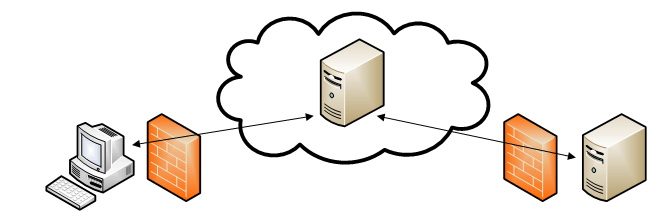
Because the server in this scheme does not require being public addressable, we bypass the problem of public IP address becoming more and more extinct. Both client and server can have dynamic IP-s in this situation. Services register themselves and the relay host has a list of available services through RSS feeds.
One of the problems is that for this work services must be instantiated before the first client request arrives. Currently something not supported by IIS7 were they are instantiated on the first client request.
In fact the service bus supports two ways to connect: relay and direct connect. In relay every request passes through the service bus. In direct connect the service bus plays the role of DNS so client and server can find each other. Once the initial connection is established client and server communicate directly. So they start using relay and go to direct communication as soon as possible.
This schema is not limited to 1 server’s client-kind of connections. Multicasting is supported as well: 1 server’s clients.
Microsoft’s idea was to extend .NET technologies to the cloud – through WCF bindings – using existing internet standards – HTTP, SOAP, Atom – in a scalable way – services hosted in MS’s data centers.
For more details about Azure and .Net Service Bus: http://www.microsoft.com/azure/servicebus.mspx A high level overview of Azure: Making sense of Windows Azure and the Azure Services Platform – Simon Devies (PPTX 3.41 MB)
The precision of a MS .NET DateTime value is more than an Oracle Date can handle.
MS .NET expresses DateTime up to milliseconds (‘d-MM-yyyy HH:mm:ss.fff’) whereas Oracle only uses seconds as smallest time unit (‘dd-mm-yyyy HH24:MI:SS’). So if you want to store .NET DateTime in an Oracle DB you’ll lose precision. The milliseconds will be truncated.
How to overcome this!
The .NET framework comes to the rescue by allowing every DateTime to be converted into a number. DateTime.Ticks property returns the number of elapsed 100 nanosecond intervals since January 1st 1601 for the DateTime in question. So we just store this in a Number field of Oracle.
A drawback is these ticks are difficult to read. For example: December 14, 2007, at 15:23 becomes 2193385800000000 in the DB. If I want to write a select query to do some lookups I need to convert the dates into ticks and vice versa. This becomes a pain very fast.
Well, it became my pain very fast so I wrote a Oracle package. Remember this is not a full solution since Oracle will truncate the milliseconds. But it is good enough to find, for example, all records between this and that day without requiring to do the conversion in code upfront.
The Oracle Package: (example below)
CREATE OR REPLACE PACKAGE NET_DATE_UTIL
AS
  FUNCTION DATE_TO_TICKS(P_DATE IN DATE) RETURN NUMBER;
  FUNCTION TICKS_TO_DATE(P_TICKS IN NUMBER) RETURN DATE;
  FUNCTION TICKS_TO_VARCHAR_FRMSTR(P_TICKS IN NUMBER,P_FORMAT IN VARCHAR) RETURN VARCHAR;
  FUNCTION TICKS_TO_VARCHAR(P_TICKS IN NUMBER) RETURN VARCHAR;
END;

CREATE OR REPLACE PACKAGE BODY NET_DATE_UTIL AS

-- NET Ticks expresses a timestamp in nanoseconds since 01-01-1601 01:00:00
DOTNET_BASE_DATE DATE := TO_DATE('01-01-1601 01:00:00','MM-DD-YY HH24:MI:SS');
CONVERSION_FACTOR NUMBER := 24*60*60*1000*10000;

FUNCTION DATE_TO_TICKS (P_DATE IN DATE) RETURN NUMBER IS
BEGIN
  RETURN (P_DATE-DOTNET_BASE_DATE)*(CONVERSION_FACTOR);
END;

FUNCTION TICKS_TO_DATE (P_TICKS IN NUMBER) RETURN DATE IS
BEGIN
  RETURN DOTNET_BASE_DATE + (P_TICKS/CONVERSION_FACTOR);
END;

FUNCTION TICKS_TO_VARCHAR_FRMSTR (P_TICKS IN NUMBER,P_FORMAT IN VARCHAR) RETURN VARCHAR IS
BEGIN
  RETURN TO_CHAR(TICKS_TO_DATE(P_TICKS),P_FORMAT);
END;

FUNCTION TICKS_TO_VARCHAR (P_TICKS IN NUMBER) RETURN VARCHAR IS
BEGIN
  RETURN TICKS_TO_VARCHAR_FRMSTR(P_TICKS,'DD-MM-YYYY');
END;

END;
/
Example:
SELECT NET_DATE_UTIL.TICKS_TO_DATE(TimestampField)
FROM MyTable
WHERE TimestampField < NET_DATE_UTIL.DATE_TO_TICKS(SYSDATE);
The two last functions convert the dates into strings. The last function will return the date according to a fixed format ‘D-MM-YYYY’ The first allows you to pass the format, in which you want to date to be returned. Any valid Oracle format is allowed.
SELECT NET_DATE_UTIL.TICKS_TO_VARCHAR_FRMSTR(TimestampField,'M-DD-YY HH24:MI')
FROM MyTable;
