Microsoft Azure allows for new business models

I’ve very excited about Microsoft’s Azure platform because it allows for some new business models.

Microsoft’s version of services in the cloud, where they provide flexible hosting capacity schemes, is opening up opportunities to small businesses to grow in way that otherwise would require them to have to convince investments companies of the viability of their product.

New Business Models

Imagine you have created in your garage the new Google, Flickr or whatever homegrown application of which you think that it will change the world. There are two possible scenarios for you:

  • Investment Capital Scenario
  • MS Azure’s Small Business Scenario

Investment Capital Scenario
In the first scenario you start hosting the application from one of-the-shelve desktop machine with a server OS on it in your garage. As the application might catch on you’l?l have to add some additional severs in your garage when more users start to use your application. Soon a single DSL phone line is not sufficient anymore so you request two or more phone lines.

Before you know it you’ve spending more time on keeping your serves alive, taking backups and installing OS hot-fixes than you can on developing new features for your fantastic application. The next logical step is that you move your application to some datacenter to get rid of the daily maintenance effort of the servers. But this requires an investment because datacenters don’t come cheap. Moreover a lot of datacenters will not help you if you’ll only need very small bandwidth capacity or number of servers. So of you go to the investments bankers and you’ll try to convince them you have the next new thing to Google.

Either you get lucky and the investment bankers see the same bright future as you or either the investment bankers all start laughing out loud. During the current financial crisis, with limited availability for risk capital, the latter case will be encountered more often than the first. By the time you get everything up-and-running probably some other guy picked up your bright idea and ran with it.

MS Azure’s Small Business Scenario
What do you really need? Small initial data center capacity with flexible growth potential. This is what I call the second scenario and this is what Microsoft Azure is all about. Microsoft will be hosting you application in their datacenter. Not for free of course what would you have expected? But they are promising to host your application even in you only need a few servers running it and not like a few hundred servers.

This way of working allows a small business to have a lot of flexibility without the middleman i.e. the investment banker. All cost-efficient models are about removing the middleman so this is a good thing. If your business is booming you will regret having to pay a reasonable ROI to the investors like in the first scenario.

You as inventor can now take the risk but it is a rather limited risk. The required server capacity can grow as your business grows. You can grow slowly and are not forced by some banker to generated huge profits that can? be reinvested into the business. The critical number of users to start with is smaller than you’ll require to convince an investment banker so you will be up-and-running faster already getting ahead of any competition. Remember in the current economic landscape it is important not only to have good ideas but also to be the first to bring these to the market.

New Programming Style
Another common problem with home-grown application is that they, most of the time, scale very badly. Everyone is clear about the fact you can’t run Google on an MS Access Database. In reality a lot of great ideas get lost because the software to support it can’t be scaled-up and -out form the home-grown application to something for a few thousand simultaneous users.

Every software architect also knows the horror story of the boss’s nephew, which is a high school student, who created a handy application in his spare time that your boss likes very much. He likes it so much that he wants it installed on the company’s internal network. The real evil begins when you boss starts promoting it and before you know it you’ll have to support something which isn’t meant to be used by more than five users.

The idea of MS Azure is to overcome these scaling issues. If you write your code against the correct set of libraries scaling will be something that works transparently out of the box. MS Azure will support multiple concurrent instances of your application distributed over several servers like you would be using a single server. The idea of moving this complexity away from the programmer and make it transparent is very interesting.

Follow-the-sun capacity
Reading about Microsoft Azure made me very happy. Because for the first time I saw support for something I call a follow-the-sun capacity schema.

I really don’t know whether the flexibility by Microsoft will be that high. It would be very nice to see something like the following being supported:
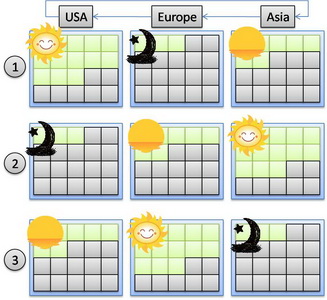
FollowTheSunCapacity
The picture indicates a flexible capacity schema according to the time of the day.

Like we already have for several years now in helpdesk support, that the helpdesk activity follows the business hours. When I’m based in Europe and I call the helpdesk during the business hours my call will be directed to the European helpdesk, if a call in the evening my call is forwarded to the Asian helpdesk and when I night help at night helpdesk USA will respond. So my call is forwarded to the location which is in normal business hours according to the time zone.

Why couldn’t we have something like that for server capacity? The capacity is augmented in a geographical location according to the number users in that location based on the level of activity required in that location for a specific moment of the day.

Remakrs
I can say I’m very excited about the potential capabilities of MS Azure. Time will tell if I end up disappointed or enlightened.

I think moving away from in-house server provisioning to in the cloud provisioning is the next step that a company needs to be focusing on.

IT infrastructure is not the core business of any company so if it can be bought as service instead of requiring huge investment, It will become the next critical success factor. In view of the current financial crisis; efficient cash flows, avoiding investment costs and short ROI times are something every company is dealing with. You might have found the answer!

Share this postSave this post

Distributed Teams and Agile Development

On a project I’m experiencing how difficult it is to work with a geographical distributed team. We rely on web-conferencing and just finding a free meeting room at any time, with a projector, to discuss open issues is not easy.

On the one hand bringing people together in one pace is costly because of travel expenses. On the other hand there is nothing like face-to-face communication that is hard to mimic even with the latest communication technology. It is not easy to find the correct balance between travel expenses and communication efficiency.

I was just wondering what agile development has to say about geographical distributed teams, when I ran into a Pattern & Practices document of Microsoft:
Distributed Agile Development at Microsoft patterns & practices. There are no chocking new things in the document but I give you some personal highlights in the case you?l don’t have the time to go through the whole document.

Collocated vs. Distributed teams
One of the best practices of Scrums says your team should have high-bandwidth communication. This is one of the forces to collocate them in one “team-room”.

The force that distributes teams geographical is globalization. Global markets mean that your workforce has become distributes over the world during mergers and acquisitions. Talent has become global as well. You might need the input in your project of one expert located in the other end of the world. Like I said above, you?l want to reduce the costs of bringing the team together.

Challenges

  • How to achieve optimal communication?
  • What to do with teams in different time zones?
  • How to avoid artifacts are affected?

    Conway’s Law says the artifacts will reflect the organizational structure that produced it.

Optimal Communication
Minimize the overhead of setting up meetings across locations. This means that your teams should, very early in the project, get used to the conference technologies to avoid any hesitation in using them. Getting the team in the habit of using the technology and making communication one of their duties is key.

Different communication technologies are available but shouldn’t be that high-tech. A phone with a headset might do! Other options are electronic sharing of documents in web conferences (MS SharedView), video or phone conferences. Instant messaging or webcams might suffice as well.

Get your team acquainted to avoid us’s vs. them’s discussions. You should bring your team together once and while to build a social fabric. Avoid the team members to change too often. Every release at least half of the team members in one location shouldstay the same!

Optimal communication is supported by the right tools. For example Teams System supports electronic scrum boards to be shared by the whole team. Good tools should adhere the natural flow of work.

Different time zones
In the case you?l have teams working in non-overlapping timezone’s, there will be communication black-outs. The strategy is to have team members working late or start early to create at least one common moment that someone in both sides is available.

Give those persons a store-and-forward role in the communication: gather information from the other site forward it to the team-members at his site and forward the information from the team-members of his site to the other site.

Some pitfalls:

  • Functionally focused distribution: testers in site A and developer at site B can result in knowledge silos.
  • Asymmetric distribution: 1 person in site A and n persons in site B can result in losing the ability of keeping the one person up-to-speed with information.

Distribution of work
Force the teams to think in the context of the results meaning in use cases or stories. Avoid that work is functionally distributed over sites. For example one site implementing only the data access related component and another site doing the user interface controls. This can be done by appointing stories to a site and not individual tasks from the stories.

Do and don’ts

  • Do: provide technology for high bandwidth communication
  • Don’t: change the team too often
  • Do: bring the team together
  • Dont: functionally distribute the work
  • Do: provide tools that can make the team work together as they would do if located in one room
  • Don’t: forget remote members
  • Do: improve the team practices to encompass the geographic distribution by gather possible improvements from retrospectives and coaching the agile practices
Share this postSave this post

SOA Meltdown

 Gartner published a research paper on SOA meltdowns written by Yefim V. Natis and W Schulte. The raised question was:

Won’t SOA suffer the same consequences, a meltdown like we’re currently seeing in the financial markets, if one of the services part of the SOA architecture would get intoxicated?

The answer is: Yes!

Simple because the chain of services used in SOA, are as strong as the weakest link is. So if you do nothing to manage this, a meltdown is bound to happen.

Gartner’s recommendations can be summarized as follows:

  • Limit the number of services you use! Not everything in an application must become a service. Typically only 5 to 30 services are required. Services introduce multiple architectural layers in order to work, that make them very heavy an inefficient if they are overly used.
  • Avoid meshes of services you have no control over! You should know if your services are using other services. This knowledge of external dependencies will give you insight during risk assessment of the whole architecture. Your service providers should openly disclose this information.
  • Monitor changes in the mesh of used services! If you have nothing in place to monitor the changes over time in the services you depend on, you’ll once again lose control and are unable, in the long run, to correctly asses any risks.
  • Don’t be responsible for the services’s state! Try to avoid request-response access to services because they make you, as service client, responsible to resolve the situation if the service does not respond or is not available. Focus on event driven designs, were requests are fired-and-forgotten to the services.  At least this takes away the immediate dependency on the service.
  • Avoid big bangs! Start small when introducing SOA. Use some pilot projects. This will allow the organization to grow and to avoid big costs if the project does not work out as expected.
Share this postSave this post

10 Immutable laws of security

Today when clearing up my desk, I ran across some old stained printouts called the 10 Immutable laws of security. Reading them again, I see the information still stands today so I thought why not sharing these with you.

10 Immutable Laws of Security: see essay on http://technet.microsoft.com/en-us/library/cc722487.aspx

  • Law #1: If a bad guy can persuade you to run his program on your computer, it’s not your computer anymore
  • Law #2: If a bad guy can alter the operating system on your computer, it’s not your computer anymore
  • Law #3: If a bad guy has unrestricted physical access to your computer, it’s not your computer anymore
  • Law #4: If you allow a bad guy to upload programs to your website, it’s not your website any more
  • Law #5: Weak passwords trump strong security
  • Law #6: A computer is only as secure as the administrator is trustworthy
  • Law #7: Encrypted data is only as secure as the decryption key
  • Law #8: An out of date virus scanner is only marginally better than no virus scanner at all
  • Law #9: Absolute anonymity isn’t practical, in real life or on the Web
  • Law #10: Technology is not a panacea

10 Immutable Laws of Security Administration: see essay on http://technet.microsoft.com/en-us/library/cc722488.aspx

  • Law #1: Nobody believes anything bad can happen to them, until it does
  • Law #2: Security only works if the secure way also happens to be the easy way
  • Law #3: If you don’t keep up with security fixes, your network won’t be yours for long
  • Law #4: It doesn’t do much good to install security fixes on a computer that was never secured to begin with
  • Law #5: Eternal vigilance is the price of security
  • Law #6: There really is someone out there trying to guess your passwords
  • Law #7: The most secure network is a well-administered one
  • Law #8: The difficulty of defending a network is directly proportional to its complexity
  • Law #9: Security isn’t about risk avoidance; it’s about risk management
  • Law #10: Technology is not a panacea
Share this postSave this post

Null Object Something for Nothing

In his paper written in 2003, Kevlin Henney presents the NullObject Pattern to deal with objects that potentially can be null and that should, if they are null, behave in a default manner this without requiring an explicit null check.

Below I give a quick summary of the idea for details you should check his paper.

A prototypic example is a logging class that is used for example in a service.  You want this to work even if no logging was configured without having to write things like:

If (log!=null) 
  log.write(?ervice Started?;

As programmer all the not-null checks clutter your code. It has nothing to do with business logic and moreover it is very error prone.  For every log write you must not forget to add the conditional check. Whereas in the business part of your code you want to treat nulls as exceptions, in this case a null is not an unexpected value. To repeat the words of Fowler and Hunt: ‘Duplicate code is considered to have a bad smell’. Don’t Repeat Yourself principle (DRY)

The solution, according to Henney, is to introduce something for nothing: the NullObject pattern. This is a common pattern found in other situations as well: null iterator, null command, …

The NullLog will be implemented as follows:

public interface Log
{
  void write(String messageToLog);
}

public class NullLog implements Log
{
  public void write(String messageToLog)
  {
  }
}

Now, instead of, having an optional relationship between a log and the service we must enforce it to have mandatory relationship. If no explicit logger is used the service will use the NullLog. We can enforce this, for example, in the constructor of the service that uses the logger.

public class Service
{
  public Service()
  {
    this(new NullLog());
  }

  public Service(Log log)
  {
    this.log = log;
    ...
  }

  private Log log;
}

In the remainder of his paper, Henney points out potential problems to this approach. How to deal with return values, out and/or in-out parameters in methods of the NullObject? The solution can be summarized in choosing intelligent defaults. For example if an int must be returned by a NullObject, we could return 0. In fact two major approaches are possible:

  • use a meaningful defaults or success defaults: 0 for an int
  • use default that result in errors or failure defaults: NaN or infinity for floating points

Since a NullObject is stateless all instances of the object are equal. So a reference to single static instance should be returned when the NullObject is instantiated.

Share this postSave this post