Category Archives: Uncategorized

Null Object Something for Nothing

In his paper written in 2003, Kevlin Henney presents the NullObject Pattern to deal with objects that potentially can be null and that should, if they are null, behave in a default manner this without requiring an explicit null check.

Below I give a quick summary of the idea for details you should check his paper.

A prototypic example is a logging class that is used for example in a service.  You want this to work even if no logging was configured without having to write things like:

If (log!=null) 
  log.write(?ervice Started?;

As programmer all the not-null checks clutter your code. It has nothing to do with business logic and moreover it is very error prone.  For every log write you must not forget to add the conditional check. Whereas in the business part of your code you want to treat nulls as exceptions, in this case a null is not an unexpected value. To repeat the words of Fowler and Hunt: ‘Duplicate code is considered to have a bad smell’. Don’t Repeat Yourself principle (DRY)

The solution, according to Henney, is to introduce something for nothing: the NullObject pattern. This is a common pattern found in other situations as well: null iterator, null command, …

The NullLog will be implemented as follows:

public interface Log
{
  void write(String messageToLog);
}

public class NullLog implements Log
{
  public void write(String messageToLog)
  {
  }
}

Now, instead of, having an optional relationship between a log and the service we must enforce it to have mandatory relationship. If no explicit logger is used the service will use the NullLog. We can enforce this, for example, in the constructor of the service that uses the logger.

public class Service
{
  public Service()
  {
    this(new NullLog());
  }

  public Service(Log log)
  {
    this.log = log;
    ...
  }

  private Log log;
}

In the remainder of his paper, Henney points out potential problems to this approach. How to deal with return values, out and/or in-out parameters in methods of the NullObject? The solution can be summarized in choosing intelligent defaults. For example if an int must be returned by a NullObject, we could return 0. In fact two major approaches are possible:

  • use a meaningful defaults or success defaults: 0 for an int
  • use default that result in errors or failure defaults: NaN or infinity for floating points

Since a NullObject is stateless all instances of the object are equal. So a reference to single static instance should be returned when the NullObject is instantiated.

Share this postSave this post

JNDI Names in TIBCO EMS Configuration

A few days ago I blogged about setting up HermesJMS for TIBCO JNDI access.

The JNDI names in that post were created by means of the TIBCO admin console but you can also create these JNDI names upfront in the configuration files of TIBCO. It is very easy just prefix the JNDI name between brackets before any definition.

For example in queues.config:

[MySampleQueue]SampleQueues.MyQueue

… results in a MySampleQueue JNDI name for the SampleQueues.MyQueue queue.

Share this postSave this post

How to Configure HermesJMS Access for TIBCO?

What is HeresJMS
TIBCO2
Hermes is an open source JMS (Java Messaging System) client. Hemes introduces itself on its website as follows (see http://www.hermesjms.com/):
HermesJMS is an extensible console that helps you interact with JMS providers making it easy to browse or seach queues and topics, copy messages around and delete them. It fully integrates with JNDI letting you discover administered objects stored, create JMS sessions from the connection factories and use any destinations found. Many providers include a plugin that uses the native API to do non-JMS things like getting queue depths (and other statistics) or finding queue and topic names.

This document describes how to connect with HermsJMS to TIBCO. The first part focuses on using JNDI lookups. The second part uses native TIBCO calls.

The test setup
For this document I used TIBCO EMS 4.4 and HermesJMS v1.12 but I think the explanation is quiet generic and will work for other versions as well.

I have two TIBCO EMS servers running on tcp://localhost:8222 and tcp://localhost:9222 making together a fault tolerant pair. This can be changed to any two machines. We will use the TIBCO admin tool to create JNDI settings.

I have a queue called SampleQueues.MyQueue with following properties

tcp://localhost:8222> show queue SampleQueues.MyQueue
 Queue:                 SampleQueues.MyQueue
 Type:                  static
 Properties:            *secure,*sender_name_enforced,*failsafe,*exclusive,
*prefetch=1,*maxRedelivery=100
 JNDI Names:            <none>
 Bridges:               <none>
 Receivers:             0
 Pending Msgs:          0
 Delivered Msgs:        0
 Pending Msgs Size:     0.0 Kb
tcp://localhost:8222> show queues
  Queue Name                             SNFGXIBCT  Pre  Rcvrs     Msgs    Size
  >                                      +--------    5*     0        0     0.0 Kb
  $sys.admin                             +--------    5*     0        0     0.0 Kb
  $sys.lookup                            *--------    5*     0        0     0.0 Kb
  $sys.undelivered                       +--------    5*     0        0     0.0 Kb
* $TMP$.EMS-SERVER-TEST.EE8499833C412.1  ---------    5      1        0     0.0 Kb
  SampleQueues.*                         +++-+----    1      0        0     0.0 Kb
  SampleQueues.MyQueue                   ***-*----    1*     0        0     0.0 Kb

I have a user MyUser configured that has full access rights on the queue

tcp://localhost:8222> showacl queue SampleQueues.MyQueue
Principal         Permissions for queue 'SampleQueues.MyQueue'
 User=MyUser      receive,send,browse

JNDI access to TIBCO
In order to access the queue through JNDI we need two things:

  1. a JNDI accessible connection factory to TIBCO
  2. a JNDI name for a TIBCO queue.

It is important to know that TIBCO is a JMS server that has a JNDI server on board as well. So you don’t need a separate JNDI server.

First we’ll create the JNDI name for the Connection Factory:
Just enter the command below to create a factory called MyFactory that connect with the TIBCO cluster.

tcp://localhost:8222> create factory MyFactory generic 
url=tcp://localhost:8222,tcp://localhost:9222
ConnectionFactory 'MyFactory' has been created
tcp://localhost:8222> show jndinames
JNDI Name       Type   Object Info
MyFactory       CF     tcp://localhost:8222,tcp://localhost:9222

Next we create the JNDI name for the queue:
Just enter the command below to create a queue called MySampleQueue.

tcp://localhost:8222> create jndiname MySampleQueue 
queue SampleQueues.MyQueue
JNDI name 'MySampleQueue' has been created
tcp://localhost:8222> show jndiname
JNDI Name       Type   Object Info
MyFactory       CF     tcp://localhost:8222,tcp://localhost:9222
MySampleQueue   Queue  SampleQueues.MyQueue

Now we are going to configure Hermes:
In HermesJMS go to ‘options’ and select ‘configuration’

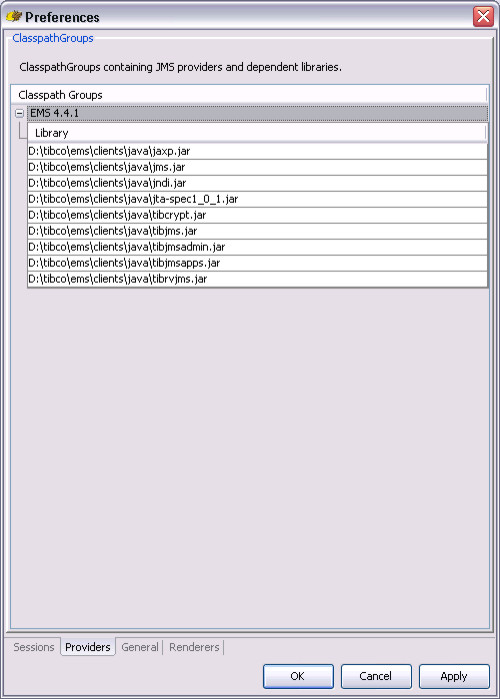
First we configure the TIBCO JMS libraries. Select the Providers tab. We need to create a classpath group. You do this by a right click and selecting “Add Group’ Give it a name EMS 4.4.1.

Now we need to add the libraries. Right click on libraries add select ‘Add JAR(s)’ then browse to the installation folder of TIBCO. I installed TIBCO under ‘c:\tibco’ If you have chosen to install the JAVA clients during the installation, you’ll find them under ‘c:\tibco\ems\clients\java’ I selected all the jars I could find but probably the ‘tibjms.jar’ is sufficient. Your configuration should now look like this:
TIBCO3

Go to the session tab in the configuration window.

Create a new session and give it a name TIBCO.JNDI. In the Plug In dropdown select ‘Tibco EMS’ and create following properties for the Plug In section as indicated below.
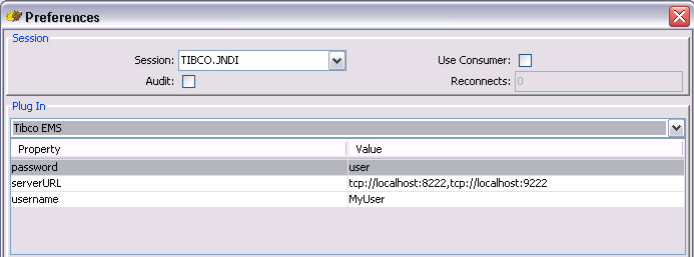
TIBCO4

In the Connection Factory dropdown choose ‘Hermes.JNDIConnectionFactory’ and for loader select the earlier created EMS 4.4.1.

Set following values for the other properties of the Connection Factory section:
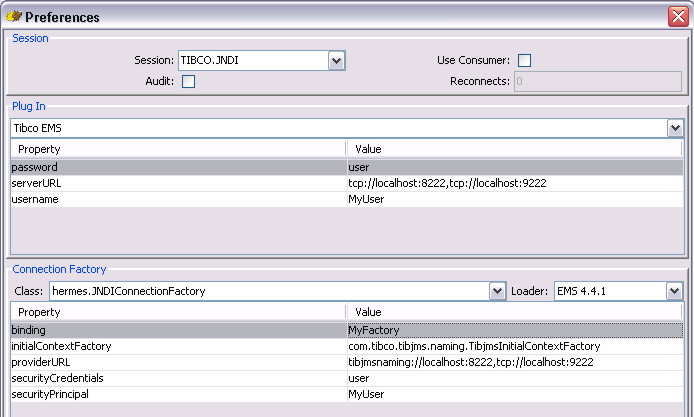
TIBCO5

The binding is the JNDI name we have chosen for our generic connection factory i.e. MyFactory.

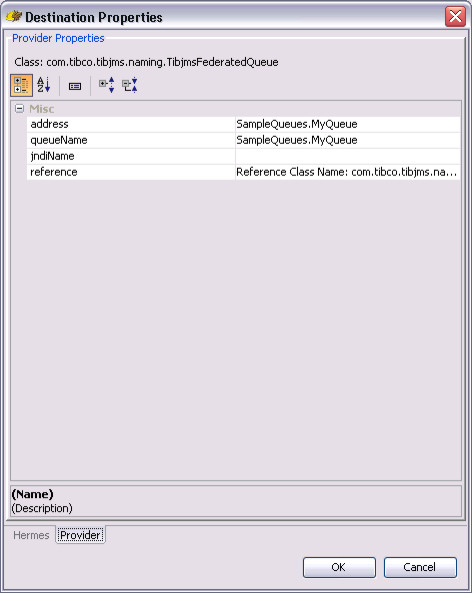
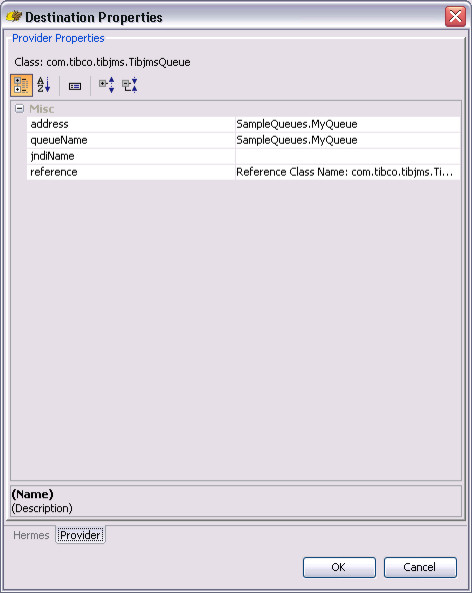
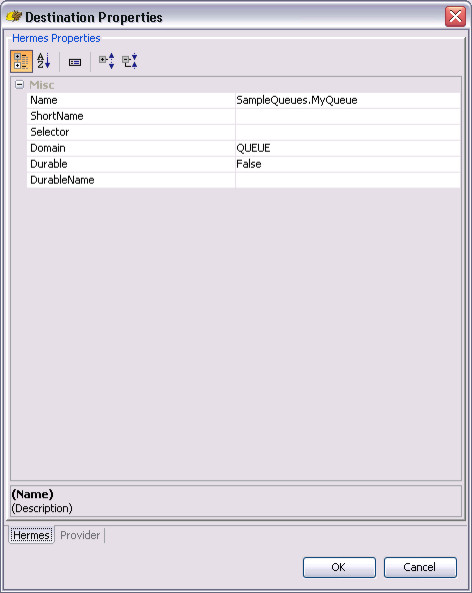
Now we a ready the add destionations. Add a new destination in the Destinations section by right clicking and selecting ‘Add’ We are now going to add the information of the queue known through JNDI as MySampleQueue: just modify the name and the rest will be filled automatically after you pressed ok. The screen should look like:
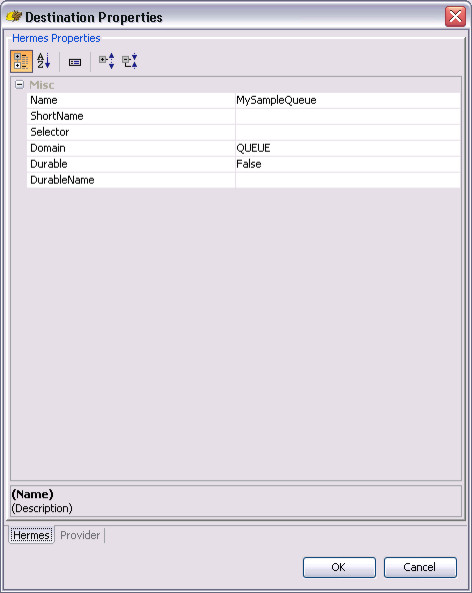
TIBCO6
TIBCO7

The setup with the filled Destination section:
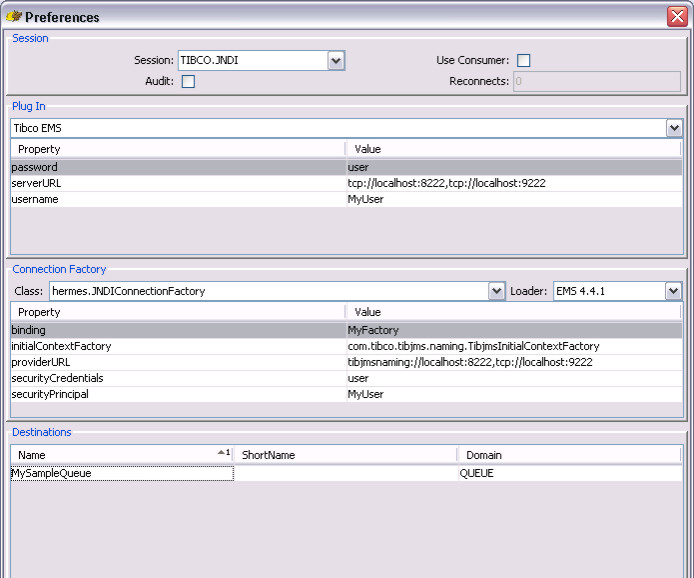
TIBCO8

To complete the setup just add the user credentials to the Connection section and press apply and ok to leave the configuration screen. We just add the credentials of MyUser:
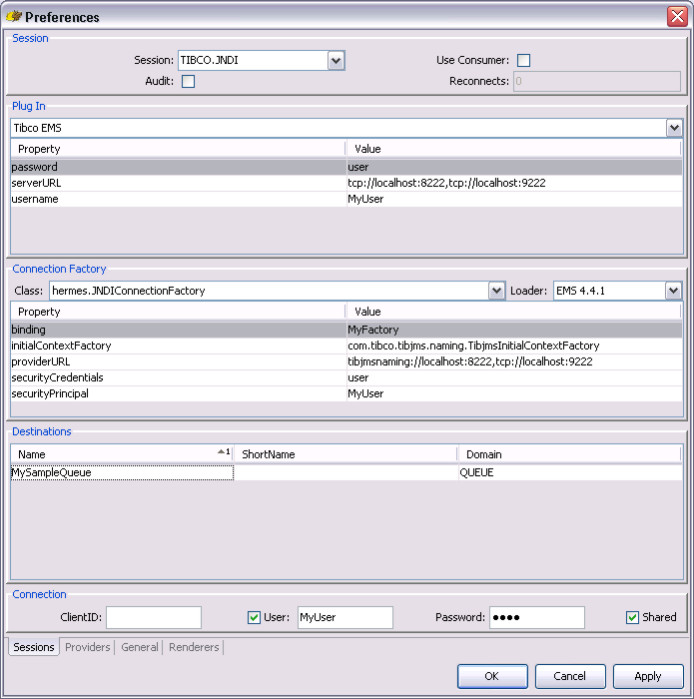
TIBCO9

Going back to the main screen you see our new connection TIBCO.JNDI with the MySampleQueue destination.
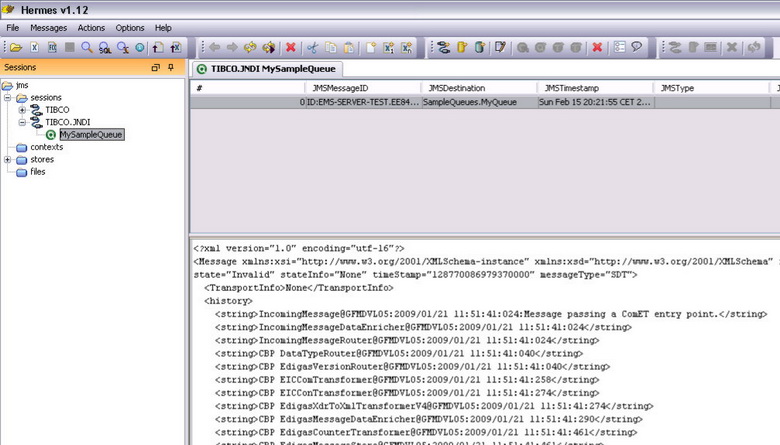
TIBCO10

Important to know is that if the user does not have TIBCO admin rights, automatic discovery is not possible!
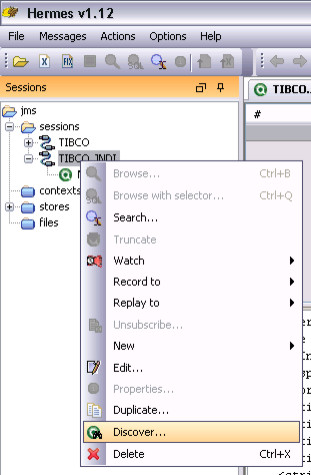
TIBCO11

Direct access to TIBCO
In stead of using a generic JNDI client to access TIBCO we can also use TIBCO proprietary classes. I created a new session called TIBCO and the configuration is as follows:
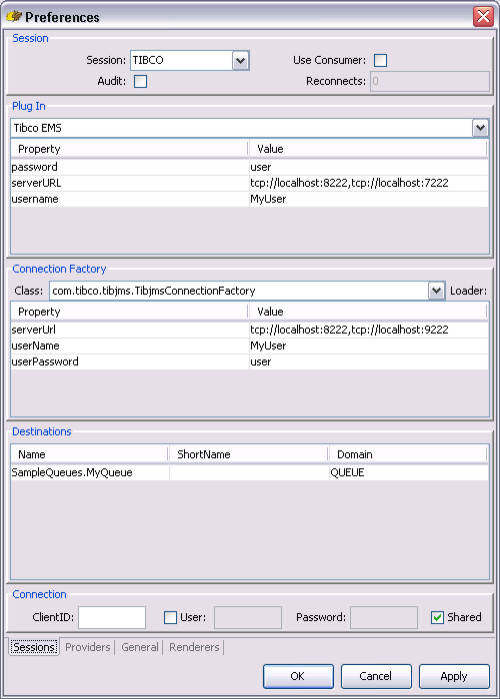
TIBCO12

It only differences in the Connection Factory section. The class does not indicate a generic HermesJMS JNDI client but uses a specific TIBCO JMS client. The destination is slightly different configured as well. To access queue we don’t need to use a JNDI name anymore. We case use the TIBCO queue name directly.
TIBCO13
TIBCO14

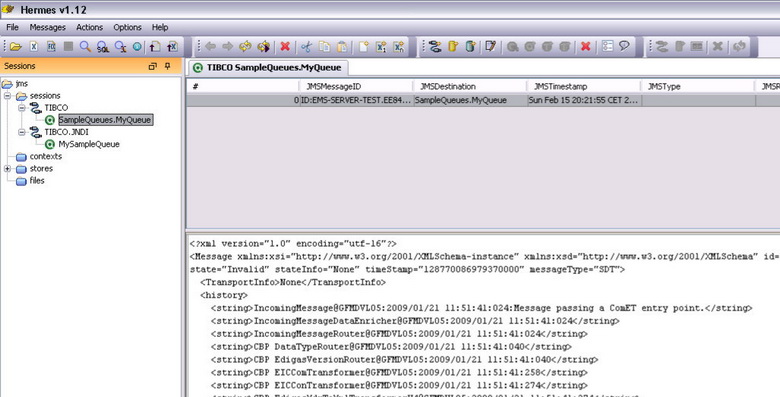
In the main screen we now have a TIBCO session and both created sessions can access TIBCO in the same easy way.
TIBCO15

Share this postSave this post

IT Project Management During the Financial Crisis

I received following link from a colleague http://www.tinyurl.com/rocksintogold, holding a slide ware presentation from Clarke Ching, that ever IT consultant should read, dealing with the financial crisis and impact on IT projects.

Ching focuses in his presentation on the return on investment and controlling the project’s costs. Although the model he presents is economically very basic, it’s a good guideline when you confronted with projects being cancelled based on cash flow problems.

For the busy consultant we all are, I made an interpreted summary of his presentation and added some ideas.

Premises:

  • Economic growth and decline are cyclic phenomena. The decline might sometimes by called a crisis and spread out in the media but you can expect that it will go better. DON’T PANIC!
  • If you, as a consultant or contractor, were working on viable project, either creating new systems that will support business processes or either creating (part of) applications that will be sold, the benefits will not disappear. If the project was viable to start with, this means there was a business need or a market for what you were doing. During the crisis the market might fall back but will recover. VIABLE PROJECTS JUST DON’T CAVE IN ON THE FIRST PROBLEM!

Focus on ROI!

Example: Think about a typical project where you will release a product in one year. The client will pay the contractors big bucks upfront during that year and after one year, when the project is finished the benefits or revenues start flowing in.

Because the client has to pre-finance everything there are probably penalty clauses in the contract when the contractor delivers late. Because of the penalty clauses the contractors want detailed project planning upfront. Any change in the project original requirements of the client results in costly change requests. This situation is presented by the red line in the graph below showing revenues over time. It is a very rigid way of doing projects. But the lack of flexibility means that these kinds of projects are axed first during financial crises.

It is easy to see why! During Q1 to Q4 the project drains a lot of cash from the client that is compensated by revenues that start flowing in form in Q5. In a crisis this cash drain might force the client to just stop the project because they can’t pay the contractors anymore although the project is viable. The crisis might affect the revenues in Q5 because people might spend less but in the end, even with reducing prices, if there is market you’ll see the revenues. In the example below you’ll break even in Q6.
ProjectCosts

How to tackle this: just create positive ROI-s faster!

The problem with the previous approach is that we have to wait until Q4 to get any positive ROI-effect.

  1. How can make money earlier?
  2. Well just start releasing products earlier!
  3. How can we release products earlier?
  4. Do phased development!

The idea is not to wait until we’ll have a fully finished product before we’re releasing something. Just organize the requirements into list going from functionality everybody really needs ‘High Added Value’ – to nice to have functionalities ‘Low Added Value’. Then divide the list into four groups: one for every quarter Q1 to Q4. The releases will focus on several basic 80/20 rules:

  • 80% of the functionality is used by everybody, 20% by experts
  • 80% of the functionality is not complex and can be delivered in 20% of the time, the 20% is complex and requires 80% of the time
  • 80% of the users only use 20% of the functionality, 20% of the very specialized users use 80% of the product

Phased product releases!

These phased releases mean that after the release in Q1 we can start making money. This is represented by the blue line making abstraction of any efficiencies and the assuming we have the same revenues for this product as we would receive for the fully finished product. In this over-simplified model you would break even already in Q2.

More realistic results!

More realistic results you’ll find in the green line. It assumes that the revenues for the intermediate products are less than for the final product but will evolve in that direction with every release.

  • On the one hand the intermediate releases will create overhead resulting in lower revenues:
    • products must be prepared for the release,
    • support staff must be trained to be up-to-speed with the latest changes,Š
  • On the other hand:
    • early birds might want to pay more to have already access to the product without having to wait until Q4,
    • because of the phased release the project will receive faster feed-back from customers that can be directly incorporated into the product
  • Allows for more agile project management:
    • problems are visible faster: penalty clauses will be less harsh because there is more control
    • requirements must be available at the beginning of every release cycle and not at the beginning of the project: no costly change requests because there is more control
    • more control means more trust between contractor and client: going from a supply-model to a partnership-model.

Conclusion

Avoid viable projects being axed because of cash-flow problems.

Look for ways to get products faster to the market resulting in faster positive ROI-s.

Look for ways to remove inefficiencies: rigid long term planning.

Organize you project so it can adapt fast to the new requirements. Focus on the requirements that give very fast added business value to your customer.

Avoid costly penalty clauses by creating fast feed-back cycles. Intermediate releases will lower the penalty clauses for late delivery and the price of unforeseen change requests because there is more control resulting in more trust between client and contractor.

Share this postSave this post

Oracle’s 9i ODP.NET Driver is not Thread-Safe

In the last year I ran into two problems with the ODP.NET driver of Oracle on a Windows platform. Both were related to the use of BLOB fields and the order of CRUD-operations in several threads accessing the BLOB fields in a DB.

Since Oracle is not willing to do anything about it, you might run into in it, even in future releases of the ODP.NET driver. To help you to avoid the pitfall I wrote this document.

Some context
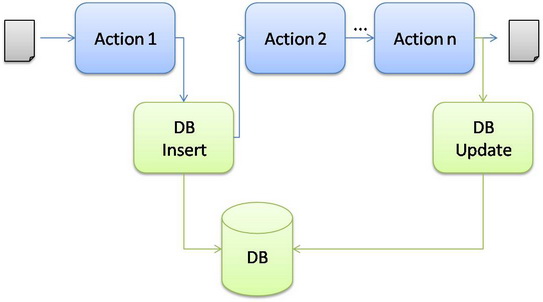
I have .NET application that has a workflow (no WCF, just plain C# code) to handle document transformations in several separate processing steps called Actions (using a pipe-and-filter pattern).

To allow for optimal parallelism every Action is running in its own thread and multiple documents can be crawling through the flow at the same time.
Flow-1
To persist the original message and the final result, we take a copy of the message and store in the DB at specific locations in the flow. We use BLOB fields to store the message content. The original message creates (Insert) a new record in the DB and at the end this record is updated with the final transformation result.

The DB Actions (green) are the asynchronous to the message handling flow (blue): we take a copy of the message but we do not wait on the DB Actions to complete. The message keeps travelling through the flow.

First Problem
Since all the Actions are running on separate threads, they are all waiting on the OS to appoint them some CPU time. Sometimes this means that a message is moving very fast from left to right (the bleu flow)

  • Firstly because DB Actions are slow compared to the basic transformation steps in the other Actions.
  • Secondly because the CPU was just appointed faster to the threads of non-DB related Actions.

This can lead to the DB Update Action firing before the DB Insert Action is finished or even has started.

We’ve foreseen this problem. To avoid a complex scheduling mechanism we just added a retry mechanism to the DB Update Action to allow for the DB Insert to finish.

Technically this all works fine but we ran into a bug of the ODP.NET driver. A really annoying bug because the driver gets in a deadlock resulting in the above system coming to a grinding halt.

What’s happing?
After some time spent on debugging my code I started focusing on the calls to and from Oracle. So I activated Oracle Tracing. You can do this by adding some registry setting to the machine executing your code.

Go to 'KEY_LOCAL_MACHINE\SOFTWARE\ORACLE\ODP.NET\Assembly_Version' You'll find two parameters:
  • TraceFileName: any valid path name and file name.
  • TraceLevel:
    0 = None
    1 = Entry, exit, and SQL statement information
    2 = Connection pooling statistics
    4 = Distributed transactions (enlistment and delistment)
    8 = User-mode dump creation upon unmanaged exception
    16 = HA Event Information
    32 = Load Balancing Information To obtain tracing on multiple objects, simply add the valid values.

Keep in mind that Oracle has made it so easy (pun intended) that it will start tracing any process on the machine that accesses the Oracle DB. So if you do this on a server, you'll end up very fast with some gigs of trace files!

To avoid showing the boring details of the traces, I just give you the results.

Basically it came down to Oracle having multithreading problems in its driver. When accessing BLOB fields, where updates are tried before inserts succeeded on a record, under high load the driver deadlocks.

In the trace file I saw that for BLOB fields, the driver keeps a local list used as temporary holding station to communicate BLOB-s between the .NET client and the DB server. The driver has also span off a thread responsible to clean-up this list. I couldn't deduct whether it was triggered by regular time intervals or based on the list's size. Anyway, it's this driver's proprietary thread that collided with the threads from my code accessing the DB.

The hard time I had to indentify the problem was due to the fact it only occurs when you really put some stress on the system. So if you locally test it on your development machine you'll never encounter it but once in production, under heavy load, your application becomes unresponsive.

Workaround!
When confronted Oracle with this, they just said they concur my results but weren't going to solve it. So I modified my flow and instead of doing asynchronous inserts (outside the flow) the inserts became part of the flow. The updates stayed asynchronous. The flow now looks like:
Flow-2

Second Problem
Sometimes the flow receives two times exactly the same message as input. When the DB Insert Action tries to create a record for the message it gets a primary key violation because the record is already there.

My first strategy was: keep it simple, just always try to insert and ignore any primary key violation. Apparently Oracle does not like this.

What's happing?
Again the driver gets into a deadlock when the system is under heavy load. Looking at the traces I saw the same problem as explained before: the driver's internal thread colliding with the driver's client thread.

Workaround!
Just always check if the record exists before trying to insert the same record.

Final comments
Looking back at the first problem I'm not that annoyed by the bug. You could say it makes kind of sense of having your data access layer single threaded even if you have multi threaded business logic running above it.

This is not the case with the second problem. As user of an Oracle library I'm not aware of its internals. So even if I use the driver single threaded from my code it can lock up.

You might imagine I'm not that impressed by Oracle anymore. I lost valuable time in debugging this.

Share this postSave this post