[MS Techday 2009] Summary “Architectures: The Good, the bad and the ugly” Miha Kralj
What is architecture?
Architecture is about models and all models are flawed but some are useful i.e. patterns & anti-patterns.
What about architects?
The arrogant Architects suffer from the McKinsey Syndrome:
- We know it all, we don’t need to listen.
- They don’t know what they really want.
- Just a cookie-cutting redelivery.
How much architecture?
A rule of thumb says 1 page of functional requirements results in 4 pages of technical requirements.
Measuring results!
Measure results to avoid a softie-softie approach i.e. the project is finished when the customer is happy.
What about home-grown application?
Avoid them! The bosses?nephew has built something your boss likes so it must be installed as enterprise product.
What about scalability, security … ? If you don’t think about these things upfront they are a nightmare to add lather on.
Only the best is good enough!
The best-of-breed:
- The best DB is from Oracle
- The best directory is from Novel
- The best distributed transaction manager is from IBM
The problem is how to get all those best-of-breeds to integrate?
The anti-pattern is vendor lock-in: buying everything from the same supplier.
Not invented here!
We can do it better syndrome. Maybe an out-of-the-box product is just good enough!
The anti-pattern is called the Golden Hammer. Use the same product in every occasion were it remotely seams applicable: just whack it with the same architecture. We have created this nice enterprise library and now we going to use it everywhere.
Skills of an Architect
Skilled Architects are capable of dealing with ambiguity and uncertainty. They also require a good set of communication skills: listen & talk to peers, to engineers ?IT pro? ?Developers and to the higher hierarchy in an organization.
The Best Architecture versus The Right Architecture
The best architecture is a dream. It is better to be approximately right then working on the ultimate system that never gets delivered. The focus must be on implementable architecture and not a theoretic pleasing architecture. Focus on pragmatism. Architecture is simplicity not intellectual violence.
Wei & Wu Wei!
Uh, what ?!? Make and Not Make. Build something to specifications, nothing more nothing less. But also build something that can grow.
Middle-Out Architecture
This means a layered architecture following the hour-glass representation: a lot of possible uses on the top and a wide range of implementations at the bottom going through a minimalistic interface in the middle results in a timeless architecture.
If you look at some of the thriving business models of the last decennia, they all follow the middle-out architecture model. For example Amazon.Com: in the middle you have AWS or Amazon Web Services opening up access to everyone that wants to integrate with Amazon. Same for live.com with the live api sitting in the middle.
Strategic Thinking Think about why something is done and not only about how it can be done! Be architects and not only engineers! In the future architects can play 3 roles:
- You can change the world!
- You can watch the world changing!
- You can wake up surprised that the world changed overnight!
Another summary you’ll find at https://community.dynamics.com/blogs/navigateintosuccess/comments/10162.aspx
“Azure? A lap around Cloud-Hosted Services.” Ingo Rammer
[MS Techdays 2009] Summary “Azure? A lap around Cloud-Hosted Services.” Ingo Rammer
What is the cloud about?
Currently we have desktop and server OS’s optimized for single machines and a bit of clustering. Once you leave the safe grounds of this one machine, support for transparently consuming resources somewhere in the cloud deteriorates very quickly.
Cloud applications are about:
- Large-scale failover capabilities
- Geographic dispersion (multi-country)
- Deployment support
- Patch Management
- Capacity Management and large-scale clustering
MS Azure tries to answer the move to cloud computing with virtualized computation, scalable storage, transparent management and development support. The concept is that applications will be build on top of a set of services provided by the Azure platform that will support the use of resources in the cloud like they were installed on one machine.
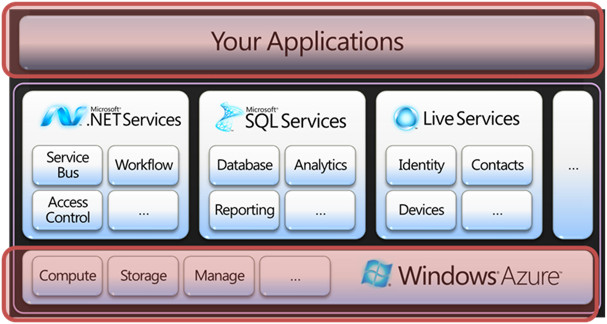
Development and Deployment
Azure Application Development Development for the Azure platform is done on a development fabric simulating the cloud circumstances. It is just way to complex for the moment to debug Azure applications at run-time in the cloud. Azure provides development storage for the same reasons.
It is a good idea to download the Azure Log Viewer and the Azure Storage Explorer, both third party, when you start developing: Azure Log Viewer can be found at http://blogs.itmentors.com/bill/2009/02/10/windows-azure-log-viewer/ and Azure Storage Explorer can be located under http://blogs.itmentors.com/bill/2009/02/10/windows-azure-log-viewer/
Azure Application Deployment
Applications for Azure are deployed through the Azure Services a portal hosted by MS. You upload your developed application and then the portal allows for zero-downtime upgrades or switch-deployments to bring your updated application into production. This means development and deployment for Azure consist of create-publish cycles.
Under the bonnet virtual machines are created to host your application.
System engineers are provided with status information about the application’s health through e-mail, instant messaging or phone calls.
Scalability and Availability
New to Azure applications is that any request in handled first by a load balancer, build-in in the platform, and then is forwarded to an instance of your application.
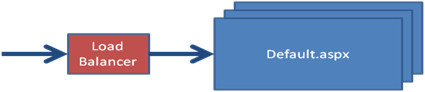
Considering scalability and availability we see that Azure really takes things further. We are not talking anymore about just a second server to have a local failover or a few machines in a datacenter to handle the load. No, we?e talking about thousands of serves in several datacenters.
The platform allows for turning-the-knob style up- and down-scaling of server capacity. It also supports dynamic capacity schemas by means of follow-the-sun server capacity. You only will have to pay for consumed resources and not for unused capacity required to handle potential peak-loads.
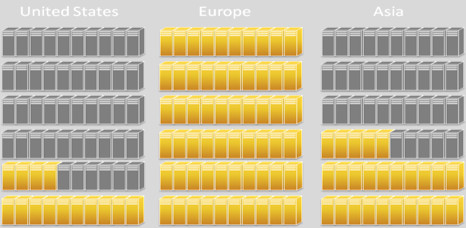
Storage
Because Azure takes control over your server instances there is no such a thing as sessions state like we are used to in, for example, IIS hosted applications. If you want some data to live longer than one request you need to use Azure Storage. All resources are logical in Azure. The platform maps them transparently to real physical resources.
Azure provides storage accessible to all instances. However there is something like Instance Storage, this should never be used to store session related data. It is just a local cache for transient data.
Azure Storage comes in three tastes ?tables (some TBs) , queues (unlimited number of messages if smaller than 8 kB ) and blobs (up to 50 GB )-and is accessible through a REST or ADO .NET Data Services interface. Data is durably stored and at least three times replicated to guarantee it is never lost.
The logical model known to the application is very simple:
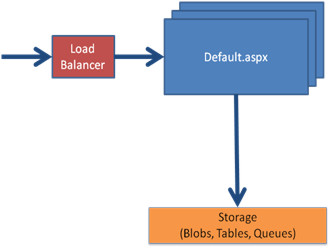
For the moment there are some limitations concerning the Azure Storage. Queues only support polling instead of event based access. Applications require full trust instead off medium trust.
Azure Storage can be accessed using two roles: a web role to support synchronous HTTP requests and a worker role for asynchronous queued requests. To avoid remarks like vender-lock-in about the storage, MS made the storage accessible from outside the platform to allow you to copy data locally.
What is showing at the horizon’s
The future will bring following enhancements to Azure:
- More types of roles (“RAW” !)
- Mangement rules, monitoring, dynamic deployment
- Geographic isolation, fault domains, update domains: some homeland security acts do not allow specific data to leave the country so the storage distribution must be done over datacenters within the borders.
- SQL Data Services
“Code Contracts, Pex and Chess” Peli de Halleux
[MS Techdays 2009] Summary “Code Contracts, Pex and Chess! Peli de Halleux”
My personal favorite of MS Techdays 2009
Introduction
The presentation was basically a walkthrough introducing three upcoming tools from MS research labs: Code Contracts, Pex and Chess.
Code Contracts
For the moment contracts and interfaces only guarantee type safety. Code Contracts framework wants to do more. The functionality will become available in .NET 4.0 through the System.Diagnostics.Contracts namespace.
Code Contracts allow for checking pre- (Contract.Requires) and post-conditions (Contract.Ensures) during development and at runtime. The functionality of checking post-conditions is really cool. A runtime rewriter will move these checks after the code were the method returns a value.
An example:
string TrimEnd(string s, string suffix) {
    Contract.Requires(s != null);
   ...
There is the possibility to put the Contacts in a different assembly and at run-time doing only light-weight checks. The tool is capable of putting the two assemblies back together.
For the moment it supports static and dynamic checking (through Pex see below). In the near future an automatic documentation generator will be added.
Pex
Pex is an automated white box testing tool for .NET. It focuses on the problem that humans are not good at creating exhaustive test cases. The tool supports parameterized unit testing. This is nothing new and already available in a lot of test frameworks. What Pex adds is a separation of concerns: humans specify the tests and test-data is generated by the tool. We are good in finding the scenario’s to test and the computer is good at creating exhaustive test-data for the test we create. Exhaustive in the sense that all code-paths are followed at least once.
An example (see below): for the method on the left , the tool will generate for every branch it finds test-date, so every branch is covered. The first if clause imposes a condition on the variable a so we see a test appearing (in the table on the right) checking for the condition null and not null. For the not null condition the tool generates the most basic data to fulfill the case i.e. an empty array.
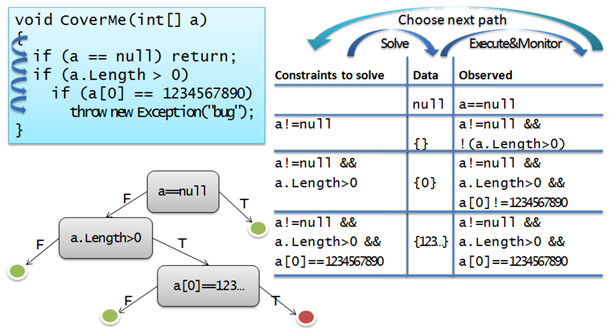
It is important to notice this is not boundary value analysis!
Pex is very handy for reverse engineering. It helps to build test-cases for legacy code. If you need to refactor the legacy code lather on, your effort is not lost. It is very easy to regenerate the tests.
Chess
Chess is a tool for finding and reproducing Heisenbugs in concurrent systems.
A Heisenbug (named after the Heisenberg Uncertainty Principle) is a computer bug that disappears or alters its characteristics when an attempt is made to study it. [Have a look at http://en.wikipedia.org/wiki/Unusual_software_bug for other unusual software bugs.]
Chess approaches these problems by taking over the thread scheduler to make the multithreading behavior deterministic. It creates fixed thread schedules that are added as attributes to your code. It is build upon Control Thread Scheduling (CAP) framework.
.NET XML Validation Pitfall
XML Schema validation for XML documents using .Net can be a tricky business sometimes. To give you an idea, have a look at the following example.
Example
We have a customer’s details in a XML document: [Customer.xml]
<?xml version="1.0" encoding="utf-8"?>
<customer xmlns="http://bluechaos.be/customers">
  <name>Dirk Vanderbist</name>
  <address>Wetstraat 9</address>
  <city>Brussels</city>
  <country>Belgium</country>
  <businessID>123321</businessID>
</customer>
Furthermore we have a XML Schema to validate the customer against: [Customer.xsd]
<?xml version="1.0" encoding="utf-8"?>
<xs:schema xmlns:xs="http://www.w3.org/2001/XMLSchema">
  <xs:element name="customer">
    <xs:complexType>
      <xs:sequence>
        <xs:element name="name" type="xs:string"/>
        <xs:element name="address" type="xs:string"/>
        <xs:element name="city" type="xs:string"/>
        <xs:element name="country" type="xs:string"/>
      </xs:sequence>
    </xs:complexType>
  </xs:element>
</xs:schema>
Who thinks that the customer above is valid according to the schema? Just raise your hand.
For those that spotted the businessID element which is not mentioned in the schema, I have bad news. The document is considered valid!
Why?
The XML document uses a namespace, i.e. http://bluechaos.be/customers, which is not referenced by the XML schema. Because of that the schema does not see any element it has to validate. So according to the schema the document is valid!
To avoid this situation you should check if the namespace used by the Xml document and Xml schema match.
Codesample
I wrote a small code sample to show how it can be done. The principal logic takes place in the CheckNamespace and CheckStructure methods. The CheckNamespace verifies if the schema has at least something to validate to overcome overlooking the missing namespace like what happened in the example above. The CheckStructure method does the actual schema validation.
using System;
using System.Collections.Generic;
using System.Text;
using System.Xml;
using System.Xml.Schema;
using System.IO;
using System.Xml.XPath;

namespace Validate
{
    class Program
    {
        private static List<Exception> validationErrors = new List<Exception>();

        static void Main(string[] args)
        {
            if (args.Length == 2)
            {
                // parse and check arguments
                string xmlFile = args[0];
                string xsdFile = args[1];
                if (!File.Exists(xmlFile)) Console.WriteLine("XML file does not exists");
                if (!File.Exists(xsdFile)) Console.WriteLine("XSD file does not exists");

                // validate xml document
                if (Validate(xmlFile, xsdFile))
                {
                    Console.WriteLine("VALID");
                }
                else
                {
                    Console.WriteLine("INVALID");
                }
            }
            else
            {
                ShowUsage(); // show the required arguments
            }

            Console.WriteLine("Press Enter to Exit...");
            Console.ReadLine();
        }

        static private void ShowUsage()
        {
            Console.WriteLine("validate [XmlFile] [SchemaFile]");
            Console.WriteLine("\t [XmlFile] Xml doocument to validadate");
            Console.WriteLine("\t           e.g. input.xml");
            Console.WriteLine("\t [SchemaFile] Xsd schame used to validadate");
            Console.WriteLine("\t           e.g. schema.xsd");
        }

        static private bool Validate(string xmlFile, string xsdFile)
        {

            if (CheckNamespace(xmlFile, xsdFile) && CheckStructure(xmlFile, xsdFile))
            {
                return true;
            }
            else
            {
                return false;
            }

        }

        static private bool CheckNamespace(string xmlFile, string xsdFile)
        {
            // check if namespace match
            XPathNavigator xmlnav = new XPathDocument(xmlFile).CreateNavigator();
            xmlnav.MoveToFollowing(XPathNodeType.Element);
            string documentNamespace = xmlnav.GetNamespace("");

            XPathNavigator xsdnav = new XPathDocument(xsdFile).CreateNavigator();
            xsdnav.MoveToFollowing(XPathNodeType.Element);
            string schemaNamespace = xsdnav.GetNamespace("");

            if (documentNamespace != schemaNamespace)
            {
                Console.WriteLine("Namespace mismatch xml:'{0}'<>xsd:'{1}'",
                 documentNamespace, schemaNamespace);
                return false;
            }
            else
            {
                Console.WriteLine("Namespace match xml:'{0}'==xsd:'{1}'",
                 documentNamespace, schemaNamespace);
                return true;
            }
        }

        static private bool CheckStructure(string xmlFile, string xsdFile)
        {
            // validate xmlFile against schema
            try
            {
                XmlTextReader reader = new XmlTextReader(xmlFile);
                XmlReaderSettings readerSettings = new XmlReaderSettings();
                readerSettings.ValidationType = ValidationType.Schema;
                readerSettings.Schemas.Add(null, xsdFile);
                readerSettings.ValidationFlags = XmlSchemaValidationFlags.None;
                readerSettings.ValidationEventHandler += new ValidationEventHandler(ValidationEvent);

                XmlReader xmlReader = XmlReader.Create(reader, readerSettings);

                while (xmlReader.Read()); //Read through the document
                xmlReader.Close();

            }
            catch (Exception e)
            {
                Console.WriteLine("Exception occured: " + e.Message);
                return false;
            }

            if (validationErrors.Count > 0) return false;
            return true;
        }

        // validate callback event
        static private void ValidationEvent(object sender, ValidationEventArgs ve)
        {
            // add exception to exeception list and dump to console
            validationErrors.Add(ve.Exception);
            Console.WriteLine(ve.Exception);
        }
    }
}
To Conclude
You should remember to check the namespaces if it looks like your XML Schema validation is doing nothing.